Rebuilding Cone's Proposal PDF Pipeline
Turning proposal PDFs from an engineering tax into a revenue surface that scaled to $100K ARR.
- Stack
- React, TypeScript, Node.js, Playwright, pdf-lib, S3
TL;DR
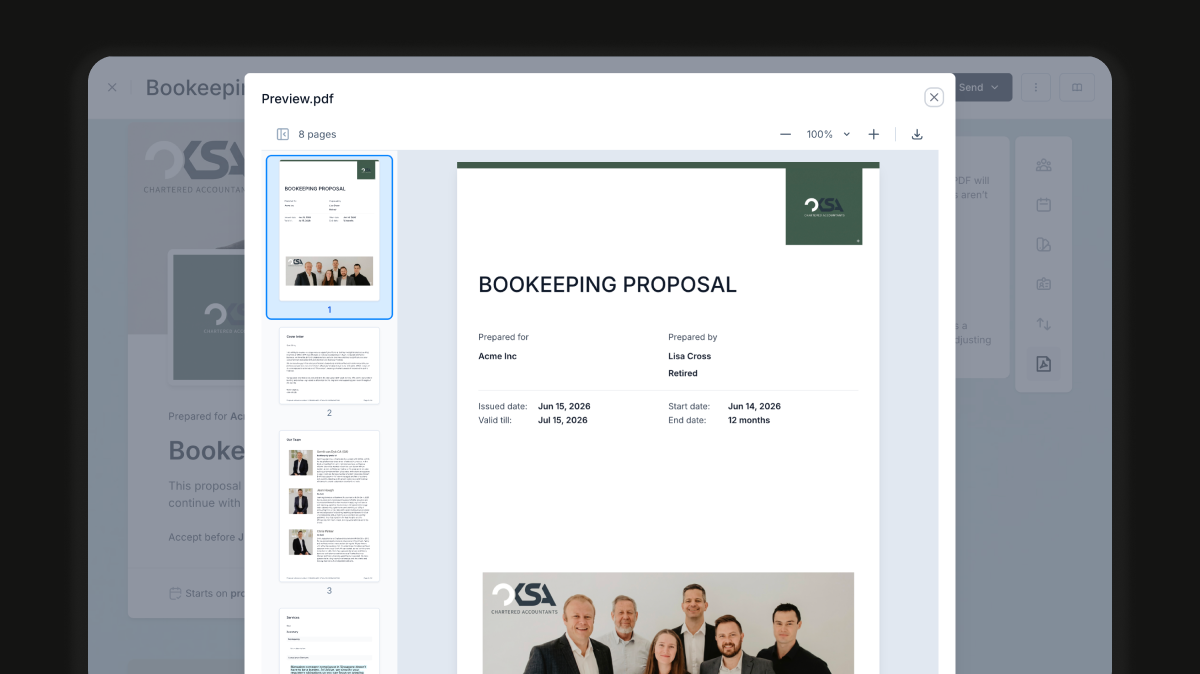
Cone's proposal product needed pixel-perfect PDFs that matched a WYSIWYG editor inside the
React app. The original pipeline rendered the preview in React and rebuilt the same document in
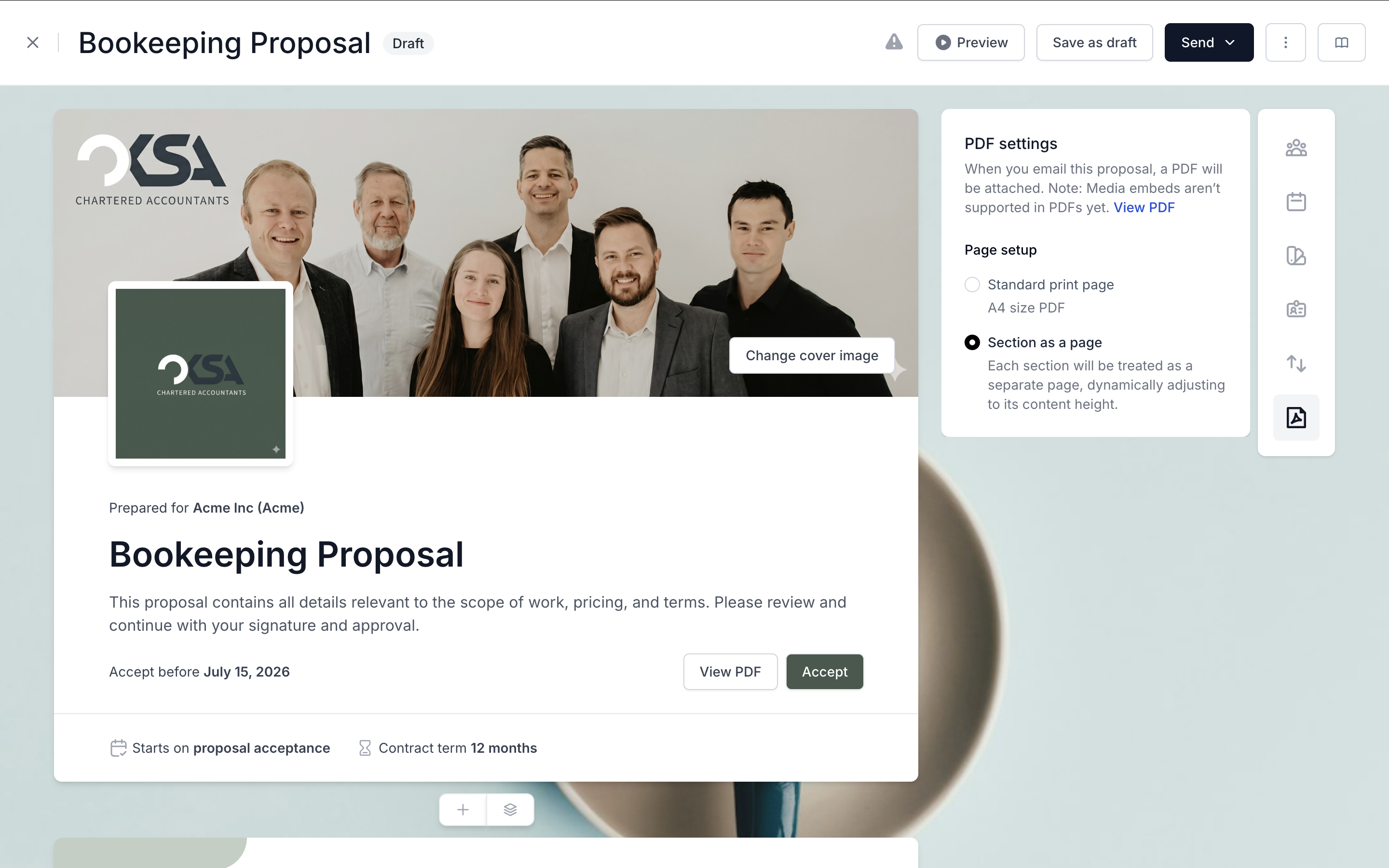
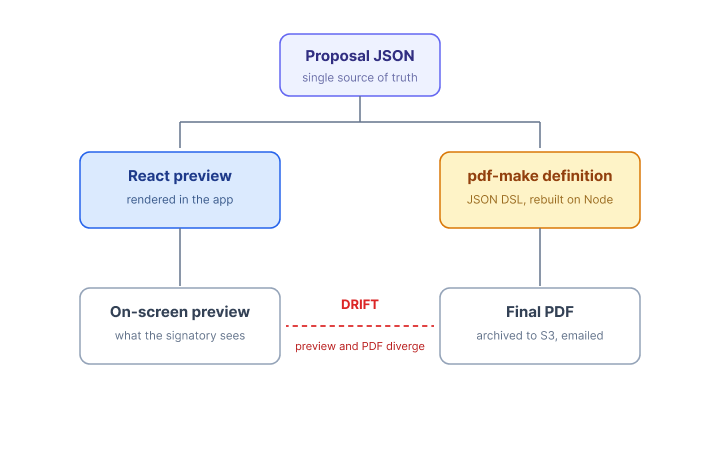
Node using pdf-make, which meant every feature shipped twice and drifted
constantly.
I replaced the entire backend renderer with a Playwright-based PDF service that loads an authorized internal print route and prints the whole document (cover, body sections, summary, and signature certificate) from the same React tree. The service also computes signature widget positions against the rendered PDF and returns them in the response, so the signing UI does not have to re-derive layout math.
Drift between preview and final PDF went to zero, and the architecture later absorbed a much harder requirement, inspired by PandaDoc: proposals where every page has a different size, computed from the section it contains.
Background
Cone is an accounting and bookkeeping operations platform (YC S22). A core revenue surface is the proposal flow: an accountant builds a proposal in a WYSIWYG editor, sends it to a client, the client signs it, and a finalized PDF (with cover page, content, and signature certificate) is archived to S3 and emailed to both sides.
Three things make this surface unusually demanding:
- The proposal is also a legal artifact. The PDF must match what the signatory saw on screen, byte for byte if possible.
- Accountants build proposals with rich content: tables, pricing blocks, embedded images, conditional sections.
- PDFs are sent to clients of accountants, so the visual quality bar is closer to a designed document than a CRM export.
The Original Pipeline: pdf-make on Node
Intially I joined, the system worked like this:
- The accountant edited a proposal in the React WYSIWYG. The preview rendered with normal React components.
- On download or send, the React app shipped the proposal's JSON to a Node endpoint.
- The Node service translated that JSON into a
pdf-makedocument definition and generated the PDF. - The PDF was uploaded to S3 and returned.
pdf-make is a fine library, and at alpha stage it got the product out the door. The
problem was structural, not about the library.
Why it broke as we grew
Every visual feature now lived in two places:
- A React rendering path (what the user and signatory saw).
- A
pdf-makedocument definition (what got archived and emailed).
A new "discount row" in the pricing table, a tweak to heading spacing, a new section type, a logo alignment fix: each one required two implementations, in two paradigms (CSS vs. a JSON DSL), reviewed twice, tested twice, and shipped together or risked visible drift between preview and final PDF.
By the time we had a meaningful catalogue of section types, every PR touching proposals carried
a tax. New engineers had to learn pdf-make semantics. Designers would point at a
4-pixel margin difference between preview and PDF and we would have to triage which side was
"right."
Rethinking the Approach
The insight was simple once stated: the preview already is the document. We had spent engineering hours forcing a second renderer to match a first renderer that browsers already rendered correctly. If we could print the preview itself, the two would never drift again because they would be the same artifact.
I evaluated a few directions:
- Keep
pdf-make, invest in a shared definition layer. Still two render paths, just better glued. The drift problem would shrink but not disappear, and our JSON DSL would have to grow as fast as our HTML. - React PDF (
@react-pdf/renderer). Same class of problem: a second component tree, with its own layout engine that does not match the browser's. - Headless browser print to PDF (Puppeteer or Playwright). One renderer. The browser is the source of truth. Print CSS handles the differences.
I picked Playwright. It had cleaner async semantics for our use case, better support in CI, and pdf() options that mapped well to what we needed (header and footer templates,
print background, margin control).
The New Pipeline
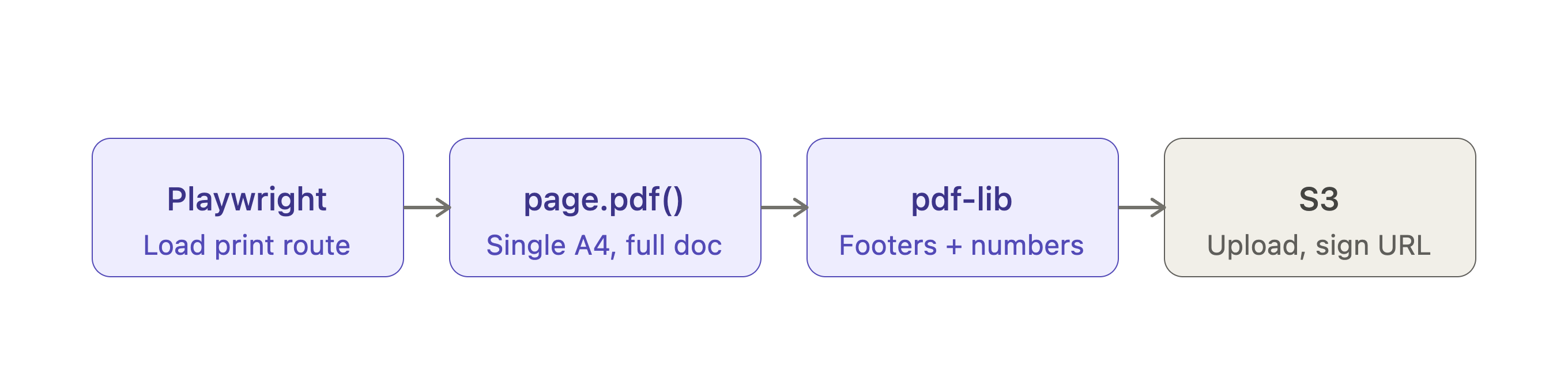
High-level flow (standard download)
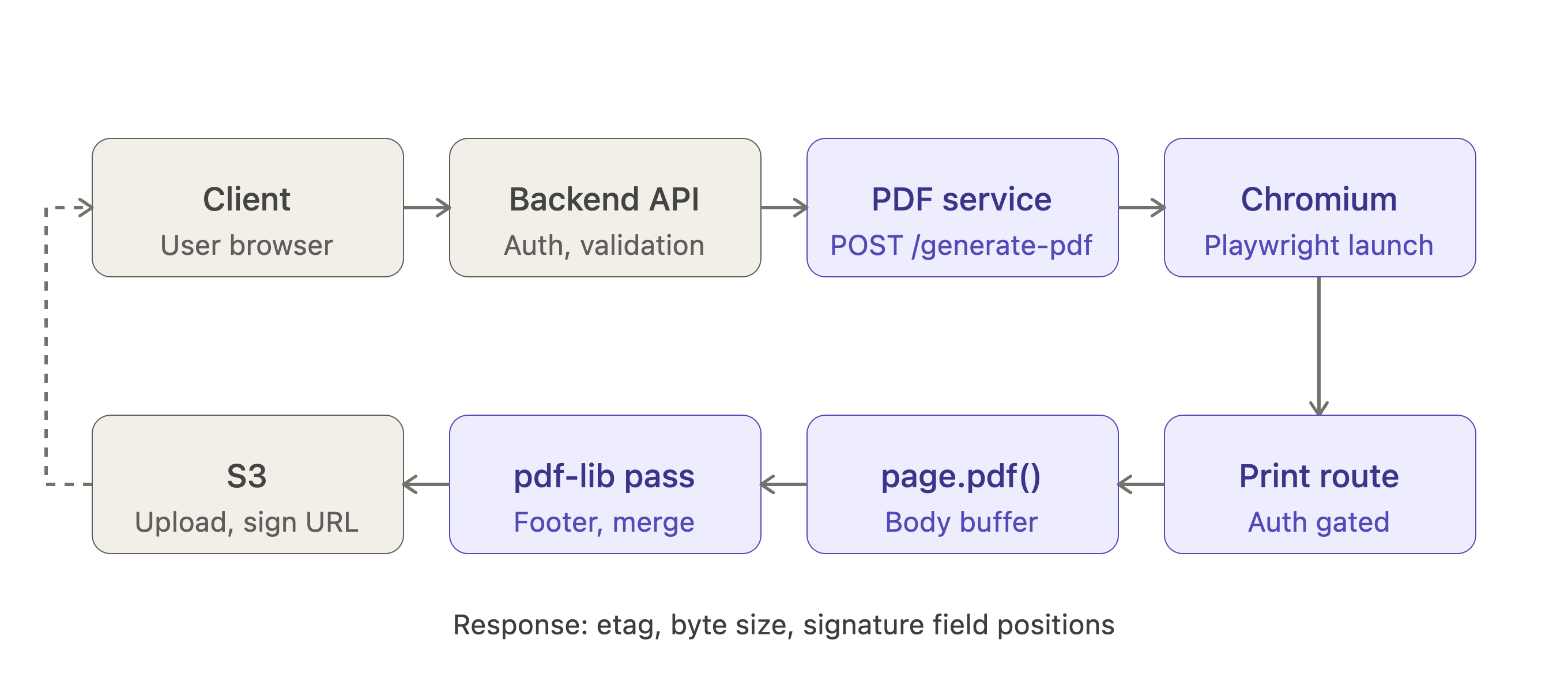
- Client requests a proposal PDF.
- Backend calls the PDF service, which exposes two endpoints:
POST /generate-pdffor the standard A4 flow andPOST /generate-mixed-pdffor the per-section page sizes flow. The backend picks one based on a flag on the proposal. - The service launches a Playwright browser context and navigates to
https://app.getcone.{env}/shared/proposals/print/{signatoryId}, an internal print-mode route. - Playwright waits for
load,networkidle, and a final DOM sentinel (#confirmation-summary-blockbecoming visible) before callingpage.pdf({ format: 'A4', printBackground: true }). That single call covers the cover, all sections, the summary, and the signature certificate, because they all live in the same print route. - The resulting buffer is opened with
pdf-liband anaddFooterToProposalPdfpass injects the proposal identifier and page numbers across the body pages. - Signature positions are computed against the finalized PDF (more on this below).
- The PDF is uploaded to S3 via
writeToS3, which returns an etag. - The endpoint responds with
{ etag, size, signature_positions, signature_positions_for_standalone_certificate
            }
.
The internal print route
The same React components that render the WYSIWYG preview render the print route. The differences are confined to:
- A separate route (
/shared/proposals/print/:signatoryId) gated by service-to-service context, that strips the editor chrome and renders the proposal in print mode. - An
isPrintflag threaded through each section component. The signatory preview includes cosmetic and interactive bits (edit affordances, hover states, helper UI for signing) that have no business in the printed artifact.isPrintswitches those off so what Playwright sees is the document, not the editor. - A print stylesheet injected at runtime via
page.addStyleTag, including@pagerules, a zero-margin first page (so the cover bleeds edge to edge), and-webkit-print-color-adjust: exactso backgrounds and brand colors render faithfully.
This route was the most leveraged piece of the system. Every visual change to the proposal automatically flowed into the PDF, with no second implementation.
Wait conditions
Print PDFs are very sensitive to "did everything finish loading." In production I waited on four
conditions in parallel before calling page.pdf():
- The navigation promise itself.
- Playwright's
loadevent. - Playwright's
networkidlestate. - A specific DOM sentinel: the
#confirmation-summary-blockbecoming visible. This is the last block the print route renders, so once it is in the DOM and visible, everything above it has settled too.
Plus a small fixed waitForTimeout as a final safety net for the occasional async
paint that none of the above covered.
In practice this caught:
- Embedded images that finished decoding after first paint.
- Fonts that resolved through a CDN.
- Inline async data (signed image URLs that the React app fetched after mount).
Result
- Single source of truth between in-app preview and final PDF. Preview and printed artifact were now the same render.
- Every new section type cost roughly half the engineering it used to, because feature work no
longer required a second implementation in
pdf-makeJSON. isPrintkept the print route honest. Editor-only UI never leaked into a customer's PDF.
Cover Page, Summary, and Signature Certificate
The print route renders the proposal as one continuous document: a #proposal-cover block at the top, a sequence of .proposal-section blocks in the middle, then a #confirmation-summary-block and #signature-certificate-block at the
bottom. For the standard download flow, that single render is the PDF. Playwright's page.pdf({ format: 'A4', printBackground: true }) produces one buffer
covering all of it.
What did get done as a separate, post-generation step was the footer (and page numbering). I
generated the body PDF first, then opened it with pdf-lib and ran an addFooterToProposalPdf pass that injected the proposal identifier and page numbers
across every page of the body, while leaving the cover and certificate untouched. Doing it after
the fact in pdf-lib was simpler than fighting Playwright's headerTemplate and footerTemplate to skip the right pages.
Where the Signatures Go
The proposal PDF is only half the story. Once the PDF exists, the signing UI needs to know where on the document to draw signature widgets when the client opens it, and where on the standalone audit certificate to draw them if that certificate is opened by itself.
The PDF service handled that too. After generating the buffer, it loaded the PDF back with pdf-lib, computed signature positions, and returned them alongside the PDF
metadata:
{
    "etag": "...",
    "size": 123456,
    "signature_positions": [...],
    "signature_positions_for_standalone_certificate": [...]
  }
Two sets of positions were computed for each request:
- On the document itself. Anchored to the last page of the rendered PDF (using
pdfDoc.getPageCount()), starting at Y=340, each signature 515x105 with a 10px gap. The partner (accountant-side) signature was always first in the array; client signatories followed. - On the standalone audit certificate. A tighter per-signature layout (151x105 with a 32px gap), used when the certificate was rendered or downloaded outside the proposal.
The reason for doing this server-side, against the actually-rendered PDF rather than predicting it client-side:
- Total page count is only known after Playwright finishes rendering. In the standard A4 flow it is usually stable, but in the mixed-page-size flow it shifts based on which sections are present and how tall each one rendered.
- The certificate's footprint grows with the number of signatories.
- Putting the layout math next to the renderer kept the calling code dumb. It sent the proposal identifier, got back the PDF and the coordinates, and overlaid widgets without re-deriving anything.
Two endpoints, same response
The service exposed two endpoints with an identical response shape:
POST /generate-pdffor the standard A4 flow.POST /generate-mixed-pdffor the per-section page sizes flow.
The backend chose between them based on a flag on the proposal. Everything downstream of the
renderer (pdf-lib footer pass, signature position calculation, writeToS3, etag and size accounting) was identical across both endpoints, which
kept the API surface clean as the mixed-page-size flow was added.
The Hard Part: Heterogeneous Page Sizes
After we shipped, a customer surfaced a requirement that broke an assumption baked into the whole pipeline. The reference they pointed at was PandaDoc, which lets each section in a proposal produce its own page sized to its content.
They wanted each page in the PDF to be sized to fit the section it contained. Not the standard A4. Not "fit content with a max." Each section produced exactly one page, and
that page's dimensions matched the section's rendered dimensions. The technical term is a PDF
with heterogeneous page sizes: each page in a PDF spec has its own MediaBox, so a single document can legally contain pages of varying dimensions,
though most tools never produce them.
The use case was real. Their proposals included a wide pricing matrix that did not fit nicely on A4, followed by a tall image-heavy services section, followed by a small terms block. Forcing all of them onto one page size meant either huge whitespace or awkward breaks across sections.
The approach
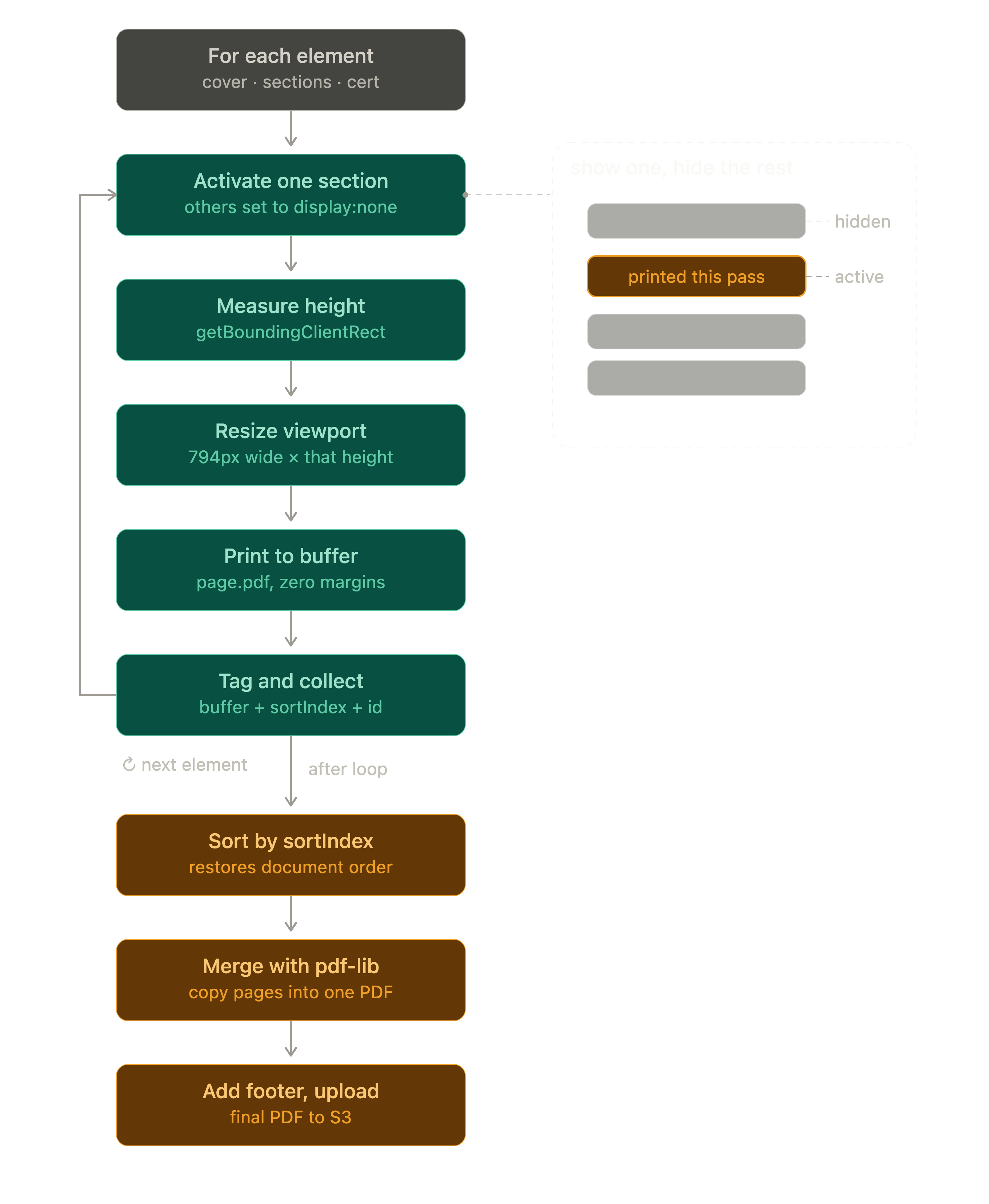
I leaned on the same idea as before: the browser already knows the dimensions of each section, because it rendered them. I just had to ask, one section at a time.
- Tag everything addressable. The print route already had stable identifiers:
#proposal-cover,.proposal-section(many),#confirmation-summary-block,#signature-certificate-block. The PDF service queried all of them up front and built one ordered list. - Show one, hide the rest. I injected a stylesheet that hid every section by
default (
display: none,visibility: hidden,height: 0) and revealed only the one carrying a.section-activeclass. For each iteration, I toggled.section-activeonto the current element and stripped it from everything else. The page now contained exactly one section. - Measure. I read the visible element's
getBoundingClientRect().height(rounded up).getBoundingClientRectis more reliable thanoffsetHeighthere because it accounts for fractional sub-pixel layout and any transforms. - Resize the viewport to match. I called
page.setViewportSize({ width: A4_WIDTH_PX, height: documentHeight }).A4_WIDTH_PXis hardcoded to 794, which is A4 width in CSS pixels at 96 DPI (210mm at 96 DPI rounds to 794). The viewport now exactly framed the section. - Print at custom dimensions. I called
page.pdf()with explicitwidth: '794px'andheight: '${documentHeight}px', plusprintBackground: true, zero margins, andpageRanges: '1'to guarantee exactly one page of output per call. - Special case the framing pages. The cover, summary, and certificate were
forced back to standard A4 with
format: 'A4'. Only the body sections got custom heights. This was a product decision: the customer wanted variable section pages, but they still wanted the cover and audit trail to look like normal letterhead. - Collect, sort, merge. Each PDF buffer went into an array with a
sortIndex: 1 for the cover, 10+ for sections in document order, 98 for the summary, 99 for the certificate. After the loop, the array was sorted by index, andpdf-lib'scopyPagesstitched all of them into a single document. Then the sameaddFooterToProposalPdfpass ran on the merged output, and the result went to S3.
Edge cases worth calling out
- The hide-by-default stylesheet was aggressive. I hid sections four ways at
once (
display: none,visibility: hidden,opacity: 0,height: 0) because individually each had failure modes.display: nonecleanly removes a section from layout, but some animations and lazy-loaded content rely on visibility checks;height: 0plusoverflow: hiddencovered the cases wheredisplay: nonewas being undone by something downstream. page-break-*rules forced toavoid. Each iteration is supposed to produce exactly one page. To prevent Chromium from breaking a tall section across multiple pages inside a single iteration, I set everypage-break-*andbreak-*rule toavoidvia*selector. Combined withpageRanges: '1', this guaranteed one page per call.- Wait between iterations. A 500ms
waitForTimeoutafter toggling.section-activeand resizing the viewport gave the browser time to repaint at the new dimensions beforepage.pdf()fired. Without it, intermittent sections would print at the previous viewport's size. - Fonts and images had to be ready for every iteration. Each
page.pdf()call inherited the same loaded page, so the upfront wait onload,networkidle, and the summary-block sentinel paid off across the whole loop. - Rounding.
Math.ceilon the height was important. Fractional pixels round-tripping between CSS layout and PDF points were enough to clip the last line of text on some sections.
Results
- Single source of truth between in-app preview and final PDF. Visual drift effectively eliminated, because preview and printed artifact were now the same React render.
- Heterogeneous page size support delivered, inspired by PandaDoc's per-section page sizing, without a parallel renderer or a new templating system.
- Operational savings of about $2K per month from retiring an external workflow tool we previously leaned on for parts of this flow, paired with Datadog monitoring and automated Playwright tests on the proposal and signing paths.
- The pipeline carried Cone's proposal product to roughly $100K ARR without re-architecting.
What I would tell another engineer doing this
- If your "preview" and your "output" are two different renderers, you have already lost. Pick the one that is the source of truth and make the other one disappear. For documents that are fundamentally HTML+CSS, that means the browser wins.
- Treat the print route as a first-class surface. Print CSS, explicit
@pagerules, and anisPrintbranch for components that need it are worth more than any clever templating layer. - Wait for the right thing.
loadplusnetworkidlecovers most cases. For anything else, set an explicit readiness sentinel onwindow. - Use the browser's measurements. The hardest version of this problem (per-section page sizes) became tractable because the browser already had the answer. The CSS pixel to PDF point conversion is a one-liner.
- Generate non-content artifacts separately, merge at the end. Cover pages and certificates do not belong in your editor's component tree.
If you want to chat about frontend architecture, PDF pipelines, or anything in this writeup, I am at mainakpandit@gmail.com.